Play tab
Play Primes assigns musical notes to the prime numbers. 24 spokes gives a diatonic scale in that each of the eight prime spokes is assigned one of the seven diatonic tones plus the octave. 36 spokes gives a chromatic scale in that each of the twelve prime spokes is assigned one of the twelve chromatic tones. Play Primes reads the cells in the PNC-sheet sequentially and when a prime number is found a MIDI message is sent through MIDI-OX.

MIDI-OX has to be installed, obviously. You will also need a synthesizer, hardware or softsynth, that receives the MIDI messages and plays them. A harp, acoustic guitar, lute or any other similar sound will sound best.

Scroll for details.
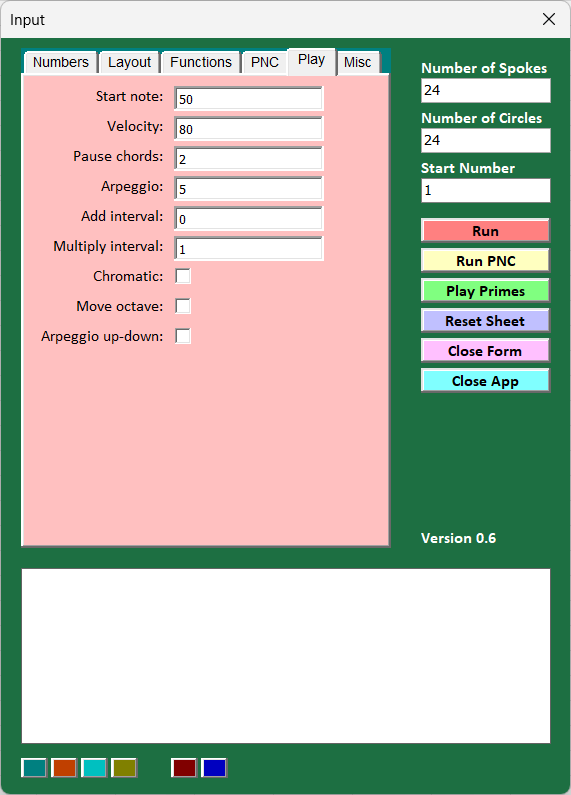
Start Note: MIDI number of start note.
Velocity: Velocity MIDI value.
Pause Chords: Pause between chords.
Arpeggio: Arpeggio effect on each circle – pause between notes in chord.
Add interval: Add interval to notes.
Multiply interval: Add multiplication value to each note.
Chromatic: Checked: Chromatic mode. 36 spokes with chromatic scale on the twelve prime spokes.
Unchecked: Diatonic mode. 24 spokes with diatonic scale on the eight prime spokes.
Move Octave: Checked: If the last and highest note in the circle is an octave, it is moved to be first in the circle one octave down.
Unchecked: Octaves are not moved.
Arpeggio up-down: Checked: Arpeggio is played up and back down again.
Unchecked: Arpeggio is played only up.